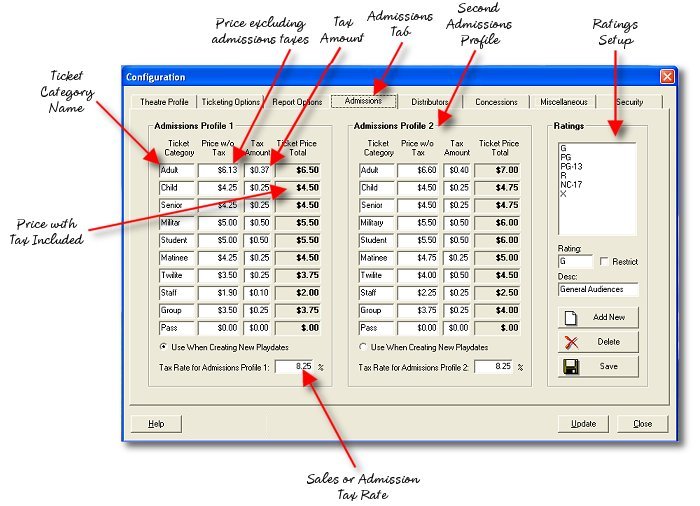
The Admissions setup page consists of setup for ticket categories, prices, admission taxes and film censorship ratings.
Frequently Asked Questions:
What Goes Here? (Fields you may not know what to enter in)
Ticket Category - This is the name for a specific admissions classification, 1 of 10 permitted in the program. Typical categories are Adult, Child, Senior, Matinee and so forth.
Price without tax - This is the price of the ticket with all taxes removed. This number is used when calculating film rental and overnight grosses provided to your home office and the film studios.
Tax Amount - This is the amount of admissions tax, per ticket at this price, that is added to the price of the ticket. When the ticket price without tax is added to the tax amount you should arrive at the round number that is the ticket's face value the customer pays, shown in the "Ticket Price Total" column.
Tax Rate for Admissions Profile - This is the actual percentage of the tax applied to your tickets. It is not used when computing film rental as the studios use the per ticket tax amount instead. This rate is here so that when computing sales taxes on the overall sale of tickets the proper amount of tax is accounted for those tax authorities.
Why are there two Admissions Profiles?
There are two admissions profiles provided, however only one may be used on any given playdate. The primary reason there is a second profile is that when a ticket price increase is coming on a certain date, you want to be able to create those advance playdates ahead of time and begin using the new prices for advance sales. For instance, it's Monday and your prices are going to be increased on Friday. People may want to purchase advance tickets for Friday earlier in the week. If Friday's playdate is created with the "Use this Profile" button selected on the opposite profile, advance purchasers will already be subject to the new pricing when buying their tickets on earlier days where the pricing policy still remains at the old prices. Either profile can be used on any playdate, however you may not change profiles for a playdate after it has been created or tickets have been sold.

Note: whichever profile is selected by the radio button at the time a playdate is created will be used for the pricing policy for that playdate. Be certain that the proper pricing policy is being used. It may be a good idea to set the two profiles up identically and only change them when a price increase is coming.